How can we help?
We're usually great at keeping secrets, but we've laid out all the answers here. Search below or browse our categories to get sorted in a flash.
Categories
What is Secret Escapes and how does it work?
Secret Escapes is a free, members-only travel club. We partner with premium hotels and tour operators to negotiate exclusive rates you won’t find publicly. Membership is free — you only need an email address, with no subscription fees. Prices are member-only and hidden behind a secure login, every property is hand-picked, and deals are time- and room-limited, so popular offers sell out fast.
There are four booking types — check your confirmation email to see which you have, as it determines who to contact:
- Hotel-only: your contract is with the hotel.
- Hotel + flights: a hotel plus a flight element.
- Secret Escapes Flexible Holiday (package): your contract is with us; we’re the tour operator and these are ATOL-protected.
- Trusted Partner holiday: your contract is with the specialist operator named in your confirmation.
How do I join or sign in?
Joining is free — go to secretescapes.com and enter your email in the sign-up field. You can sign up with email and a password, or continue with Google or Apple. After signing up you’ll get a confirmation email; once your account is active, log in to see member-only prices and book.
Used Sign in with Apple? Apple may create a masked email address — check your booking confirmations for the exact email used, as you’ll need it to log in and manage bookings.
How do I manage my account?
Log in and click the person icon (top-right) to manage everything: Personal Details, My Bookings, Account Credit & Vouchers, Mail Preferences, Reminders and Country Membership.
- Change your email: do this yourself under Personal Information (website only) — for security, agents can’t change it for you.
- Change language or currency: update your territory under Country Membership on the website, then reopen the app.
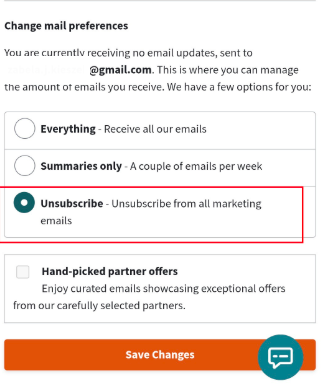
- Email preferences: set frequency or unsubscribe under Contact Preferences → Mail Preferences.
- Cancelled bookings are visible only on the website, not the app.
Why can’t I see prices?
Prices are exclusive to members and hidden from the public, so you’ll need to be logged in. If you’re not yet a member, join for free at secretescapes.com, then log in and open any deal — the price and details appear beside the images. If the price still doesn’t show after logging in, refresh the page and check whether a “Sale Ended” banner is displayed.
I’ve forgotten my password, how do I reset it?
- Go to secretescapes.com and click Log in.
- Click “Forgotten your password?”.
- Enter your registered email and submit.
- Open the reset email (check Spam/Junk) and set a new password.
Signed up with Apple or Google? you don’t have a separate password, log in with that same account. If you’ve lost access to your account email, please reach out to us to verify your identity.
How do I delete my account?
Log in on the website, click the person icon, select Personal Details, scroll down and click Delete my account. If you haven’t booked in the last 5 years your account is permanently deleted; if you have, it’s deactivated instead to meet legal and tax requirements. Any remaining credit or vouchers are forfeited on closure and can’t be refunded or transferred.
Is there a mobile app?
Yes! The Secret Escapes app is free on iOS and Android. You can browse and book deals, view bookings, access travel documents and manage your account.
A few things are website-only: changing language/currency, updating your email or password, viewing cancelled bookings, and Google Pay. If a booking doesn’t appear, log out and back in to refresh.
Stop and verify. Could it be phishing?
We want our members to book with confidence. Here’s a short checklist to help protect yourself from potential phishing attempts:
- Always be cautious if you receive unexpected messages relating to your booking, even if the message contains genuine details such as your name, hotel or travel dates.
- Be wary of messages asking for additional or urgent payment, card details or other financial information, especially where the request is made via WhatsApp, SMS or an unfamiliar email address.
- Do not click on unexpected payment links or QR codes without first checking that the request is genuine.
- Fraudsters may impersonate hotels or use information relating to a genuine booking to make a message look more convincing.
- If you receive an unexpected request for payment or card details in connection with a Secret Escapes booking, you should verify it before taking any action by contacting customer service.
- Members should not provide passwords, security codes or full card details in response to an unsolicited message.
- If you are concerned that you may already have given payment information to a fraudster, you should contact your bank/card provider immediately and also let Secret Escapes know.
- Where possible, members should communicate with Secret Escapes and/or the hotel using contact details or channels they already know to be genuine, rather than replying directly to a suspicious message."
Still need help?
Our team is here to help. We only use your personal data to securely respond to your enquiry. See our Privacy Notice for details.
Chat with us
Need a quick answer? Chat directly with our support team in real-time for immediate help with your booking or trip.
Email us
Detailed query or docs? Email us with your booking ID in the email body. AI handles some replies, with our team monitoring and on hand.
Call us
Prefer to speak to someone? Our support team can talk you through any issues.